Showing posts with label DOWNLOAD VIDEO. Show all posts
Son of legendary Afrobeat musician, Seun Kuti has challenged the security authorities to move to arrest controversial actress for naming her cats with the president’s name.

Popular Nigerian musician, Oluseun Anikulapo Kuti, widely known as Seun Kuti, who is the youngest son of legendary Afrobeat pioneer, Fela Kuti is back in the limelight.


Seun who now leads his father’s former band Egypt 80, took to his Twitter page and reacted to the reports that popular Nollywood queen of B00bs,
Cossy Orjiakor named her cats Buhari and Goodluck.


Read his reaction below;


 It would be recalled that sometime in August, a man named Joe Chinakwe, a trader in Ogun state, named his Dog Buhari which led to his arrest and his arraignment in court for his action.
He was later released on bail after spending some days in detension.


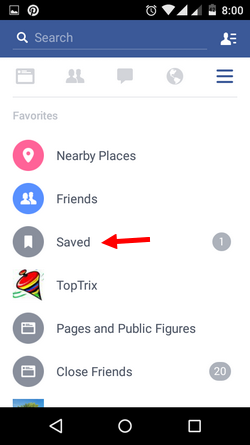
To download Videos from Facebook Android application:
You can save video using the Facebook application also with little workaround. 
Follow the Steps Below


1. Install ES File Explorer, a must have application for your android mobile. The best free file manager with great interface and many powerful features. ( I am not promoting it, its really so feature packed.)
2. Now open any video on Facebook application and click on the drop down arrow for particular post to get options.
facebook-post-drop-down-menu
3. Tap on 'save video' The video will be saved to your saved list of links and videos.
saved-links-videos-facebook-app-settings
4. Go to  the Facebook options by tapping the hamburger menu and click 'Saved'.


5. It will show you the list of saved videos, links and other stuff.

6. Click on video you want to download, you will get the option 'Open with ES Downloader'.
download-facebook-video-es-download-manager


7. Click on 'Just once' or 'Always' to save the video for offline viewing.

VIEW ALSO: HOW TO SAVE FACEBOOK VIDEO FROM PC OR MOBILE BROWSER


Facebook hosts large number of unique videos that you do not find on YouTube or other video hosting sites. If you want to download any video on Facebook, you don't need any extra software.
Even as facebook sometimes serves as a storage platform for pictures, it has been hard to get videos easily downloaded from this awesome site.

 This post is a breaker for people who has been looking for how to download awesome and memorable videos shared by their loved ones.

 This simple URL trick will enable you download ans save videos from facebook for offline viewing using website on PC or mobile web.


 STEPS.

1.  Play the video to be downloaded and right click on the video. Click show video url, and copy the url.


2. Paste the URL in a new tab or same tab and replace the "www" with "m" and click enter.


3.  The video will load on your browser like a mobile browser. Right click and you will see "save as".


4. Click the "save as" select where to save to and name your video.


ENJOY YOUR VIDEO OFFLINE

Mobile Facebook website on mobile:
To save video on your mobile is very easy. If you are using mobile browser, you will be automatically redirected to mobile version of Facebook website i.e. https://m.facebook.com/ .  Just touch and hold on video to save it for later use.


Copyright © 2013 β£țåβ垣